 [Amazon/Kindle/DRM/Capitalism/Digital Ownership]
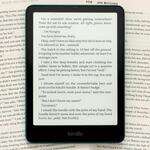 Amazon’s killing a feature that let you download and...
back up your stuff now if you want online backups 
...offline. shh I just woke up
I tried to do this but couldn't figure out how to do it without a physical Kindle, and I sure as fuck wasn't going to get a physical Kindle just to do it, so, welp, oh well

fuck Kindle, also, gonna continue buying books physically or from bookshop dot org for any ebooks
for anybody wondering: this happens on Feb 26th
seems very class action lawsuity but 
noctowl: give me a few minutes, and I'll find the instructions that let me backthings up without needing a physical kindle. i did it last night.
oh, thank you!
that's much appreciated (and sorry for being grumpy in your plurk op, I've gotten very very particular about book ownership lately)
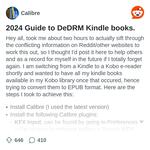 From the Calibre community on Reddit: 2024 Guide to ...
I followed those instructions exactly, and managed to jailbreak over 500 books.
thank, I will take a look tomorrow (when I don't have a cat resting on me)
at the VERY LEAST, it gives you a link to a version of kindle that still lets you DL things without too much drm
yes that was something I came across too when trying to find solutions, that earlier versions of Kindle were better about it (because of course)
the biggest roadblock was "well the instructions for that are on that reddit over there. it works for everything. [doesn't link]" or "without a physical Kindle you're out of luck"
Yeah I was worried I'd have to buy an older kindle, and then we were given the deadline so I hustled. Fortunately, I was linked this page from r/books iirc.
nobody can afford a dang Kindle right now nor has the TIME ahaha sob
at least with breaking these books I have out of Kindle jail I can maybe put them on another device down the line (have to figure out a good non Kindle reader app for my iPad)
I need to go write to australia's consumer protection, this is bullshiiiiiiiiiiiiiiiit. and not everyone HAS wifi
its absurd and it's certainly not going to make anyone buy a damned Kindle
especially not when they push out low quality products claiming they're top of the line and new
I have to remind myself I need to get this done by the 26th, it's the 18th now and I've got time. and thankfully not as many books as others
only like 40+ maybe and some of those I have physical copies of anyway
I also look forward to people figuring out how to break out Kindle books after this goes into effect too honestly because people always find a way and corporations are not as clever and all powerful as they think
I know having the kindle app on my computer counted as a "device" for purposes of download/transfer via USB when I did that this weekend.
(I downloaded everything so I have the files, and I'll break the drm some other time.)
yeah i still need to look into how to break drm but i was able to get everything but one book downloaded. not sure why that one didn't work
ugh  Amazon makes me sick
Amazon makes me sick
ashenkey: thank you so much. I'll give this a try for whatever I have left on my kindle.
Woof i was trying to get things to work last night with no luck so i'll be giving these other instructions a whirl, thank you
oh, having a chromebook makes things so much harder 
I use a kindle ripper.
coffeeforink: details? I've neevr been able to get the Calibre thing to work
I haven't had much luck with that one either. I use Kindle Converter. You can find it here Kindle converter
You've gotta keep it updated to keep up with Kindle's updates or it blocks it, but I've had great luck with it.
thanks!
For folks looking for new ereading apps i saw good things about Neoreader. Available on android and sideloady onto everything else.
https://Bookshop.org also just started selling ebooks and using their own software
i'm so glad i got myself a stupidly cheap used kindle for this Exact Thing. guess i'll get back on backing up my library in full lmao.
Moonreader is also a good e-reader app.
problem with Bookshop is that you're locked into their app
so if you want to read the book you paid for on a different app, you're out of luck
I use Calibre with the DeDRM plugin + KFX input/output + Kindle 4 PC 2.3 to do my books from Amazon. DeDRM also works on Kobo books. Problem is, Amazon is where 90% of the sales are. Most self-published authors publish exclusively with Amazon, so Kobo/Play Books/B&N aren't going to have the range
and in the US, a lot of libraries use Libby for their ebooks, with a good portion being Kindle.
also Dealing with Kindle ebooks in calibre - MobileRead F... this is an extensive guide for Kindle books in calibre
the entire site's an excellent resource, and I enjoy the fact it's old school forums
also if anyone has questions about backing up books, I am very familiar with Windows methods. I don't have a Mac so can't speak to how Apple does things
I don't think I've personally come across a book in Libby I couldn't download as a ascm and open in Adode to read as a epub. (and also use an old version of calibre and de Dr to jail break)
yeah I use that method too
if it doesn't send it to Amazon to fulfill the loan
Play Books uses ADE as well
so I've used it a lot to backup the books I bought there (100+)
I have 2k books in Amazon, mostly from those stuff your kindle promos and books on sale (like .99 -2.99)
i honestly wont be surprised if amazon moves into pressuring ppl into some sort of e-book subscription program down the line
probably not, they have KU already
and they pay out more than they take in if someone reads more than 10 books in the prgram a month
bc they pay out on page reads
I'm not sure of the exact amount, but a lot of people make living wages writing books just for KU
amount per page*
I have Linux on desktop and so I can’t install the Kindle app, and I also don’t have a physical Kindle so I couldn’t figure out how to download when I found out last night  if anyone can help I would appreciate it.
if anyone can help I would appreciate it.
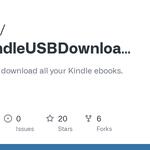 GitHub - Jedi425/BulkKindleUSBDownloader: Quick scri...I looked at MobileRead and found this as an option
thank you for the added resources everyone!
 we're in this together (together being taking ownership of our books we literally paid for bc fuck amazon)
MobileRead Forums - View Single Post - Amazon is rem... link to the post talking about the script I posted above
I've tried this website: https://dedrm.com/ to remove the DRM from one of the kindle books I bought and it seems to have worked (at least on Moon+ Reader)
I've not tried the DRM-removed file on my paperwhite yet
welp i guess I better clear my calendar
BLESS Y'ALL it's working
goodnonsense: Which method?
The Reddit one!
I haven't tried moving anything to my Kindle but it's letting me download everything and I tested removing DRM. It let me convert to pub as a test
I'm doing something wrong then
I've yet to figure out how to un-DRM any of my purchases, I'll have to try some of the stuff here
this is why I try to keep files of all my e-things u_u
For those doing it the calibre way: very important that you change the download location file before you start downloading ANY ebooks or the de drm will not work on some of them pls learn from my mistake
Moxana: where does it need to be? this might be my problem.
Anywhere that isnt your onedrive
And if you dicked up like me and downloaded to the default onedrive location youll need to delete the kindle app and all downloaded books and start over with the very specific kindle app version on the reddit
I recommend the hard drive local documents folder but anywhere local is fine
Ah, that doesn't fix my problem then. But hopefully it helps someone else! Thanks!
the reddit link i posted, i had to follow EXACTLY, including to create a new folder to extract the deDRM plugin zip to. Previously, I couldn't get it to work. But sadly, that's all I can do as far as troubleshooting goes.
Just did some (very old .AZW files admittedly) thru Windows desktop Kindle App > download my books ("docs") from amazon's cloud > convert in Calibre to .EPUB & save to disk > open and read with no worries in Aquile
I use a chromebook, so this has been a journey, but it seems that, for me, Calibre 7 crashes, so I downgraded to 6.29, followed the guide from reddit and it's working just fine. just in case anyone else had the same issue!
after several speedbumps I also got most of my stuff into Calibre 👍🏻
floodplain I think you have a kindle. I don't remember who else I know for sure has one.
thanks for ta g
I'm trying the method ashenkey posted right now and it works I feel so powerful
you guys have four days left to do this btw!!
also!
this was posted for a list of drm-free books
(for purchase)
there's one ebook I thankfully do not need to do any of this for since I own a hardcopy of it